


Vidu Q2: Full Release! Review + Tips

Vidu has just released two amazing new features, rounding out Q2 to its full release! Those features are Extend Video and Reference to Video for Q2!
I finally had some time to sit down and play around with it a little bit, but during the weekend I will definitely be trying it out more. They also added a sound effect and voice feature (with preset voices). So far I've only tested the sound effects, and I'll talk about that below too!
Honestly, Vidu is extremely underrated and I urge people to give it a try. It has amazing tools that make it a creator's best friend and it will only continue to improve.
First, let's start with the References feature.
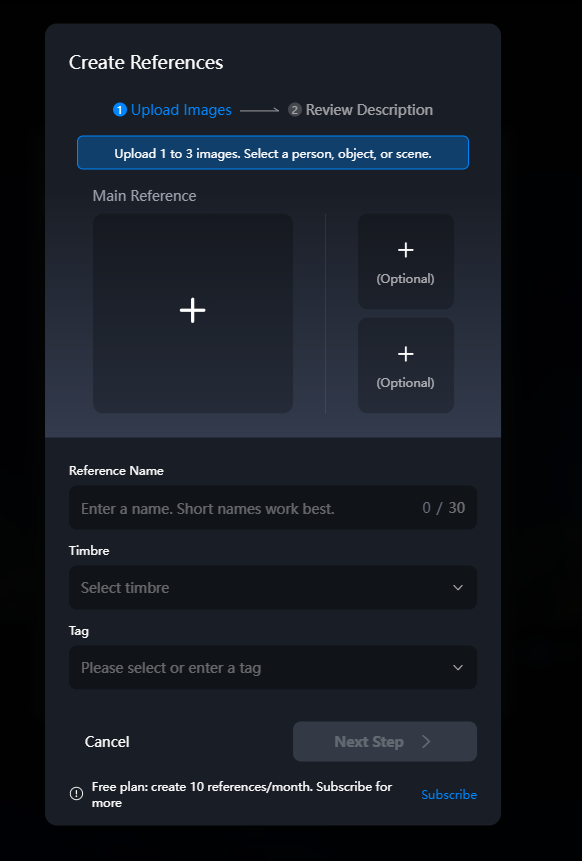
You can create references of characters, scenery and anything else you can think of. The awesome part about this is that I've even tested putting entire character sheets into one of the slots and it STILL WORKS BEAUTIFULLY! Meaning you can pack a whole lot into these bad boys to have some truly impressive character accuracy.
The great part about this is that even free accounts can make references! Up to 10 a month, as you can see in the text at the bottom of the screen.
Now when you go to Reference to Video mode, you can see all the references you made and load them right into your prompt with a click.

You can even extract frames from previously made videos to use as a reference! How cool is that? My favorite thing about this entire feature is just how easy and intuitive it is to use. The references are loaded into your prompt as little buttons that you can click and drag around anywhere in your prompt with ease.
As you can see here, I moved my reference buttons where I thought they'd have the most impact on the output. It can take a little bit of playing around with the prompt to get the output you want, but this only took me 2 tries which isn't bad.
Here is the final output (I stitched two scenes together here).
Now I'll talk a little bit about Extend Video which is also an awesome tool. Clips you generate can be extended to be up to 5 minutes long according to the tooltip! But I think this feature works best if you have a fixed camera/character, like a dance video or talking scenes. However, I haven't used it too many times yet, so I don't claim to be an expert.
You unfortunately do need to be a premium subscriber to use the extend video feature, so if you are tight on money you can absolutely make things work with the Extract Frame and Reference to Video tools--you'll just need to take a little time to stitch the clips together.
I also nearly forgot to mention that Vidu has added voice and sound effect support! I have not tried the voice feature yet but you can use preset voices only and I believe it also does lip sync which is awesome. The sound effect feature is pretty good too, although it is not quite at the level where I would use it over my own custom curated SFX, but it's great to see these are things they are working on/adding. I suspect it will improve dramatically in the coming months, so let's keep watch and see what the Vidu team cooks up next.
In summary, Vidu Q2 is an absolute blast and you should definitely try it if you're a newcomer who wants to get started with video generation or a seasoned AI video maker; both groups will definitely appreciate the variety of tools Vidu offers as well as how intuitive everything is to use. They also have a Discord channel with a small but friendly community!
If you're looking to make an account, Vidu is doing a promo right now where new accounts get 1000 credits if you sign up using their official referral code, which you can find Here on their X post about Q2's Reference to Video.
There is no expiration date listed on the code, but act fast because I'm sure it won't last forever! I hope you take the time to give Vidu Q2 a try and have as much fun as I am with it.
Happy creating!!
I would also like to write a small special thanks for a user in the Vidu Discord for teaching me some tips and tricks in Vidu! They taught me the trick with extracting a frame and using it as a reference, which is super useful.
Their name is RainbowLandTales, and if you would like to check out their work and give them some love, visit their YouTube.
